 RoundXer
RoundXer
Your ward-round list, offline and encrypted. Patients by area, progress notes, follow-ups and handover — in place of the paper list.
Free · No account · iPhone coming soon · All downloads

The paper list, done properly
Made for doctors who round on inpatients every day: everything you carry on the round, in the order you present it.
Your round, in order
A list per ward or unit, in your round order or sorted by bed, with a "seen" tick that resets every night.
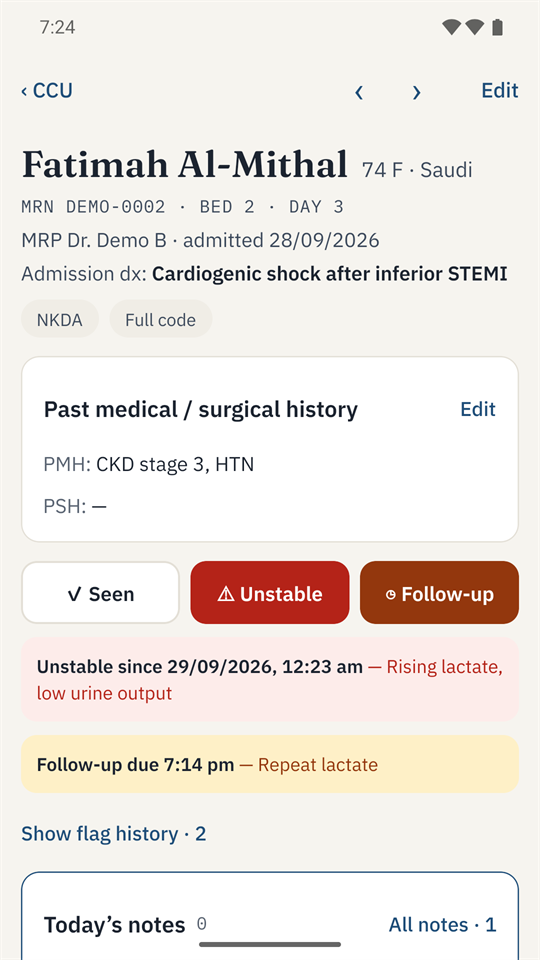
Flags that stay on top
Mark a patient Unstable or for Follow-up with a reason and a due time, and get a reminder when it is due.
The whole patient on one page
History first, then today's notes, problems, medications, investigations, procedures, consults and hospital course.
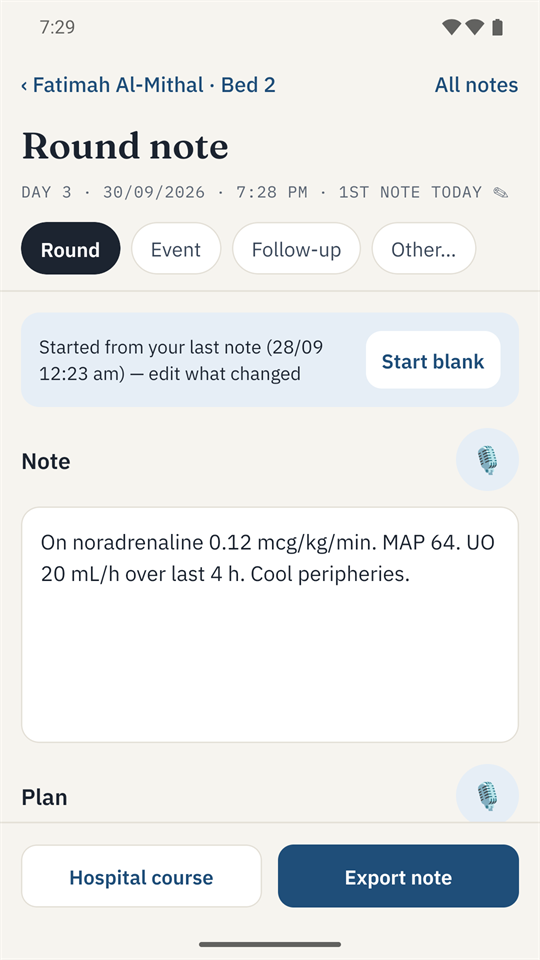
Notes that start from yesterday
Several notes a day, each starting from your last one, saved as you type. Export them with your own templates.
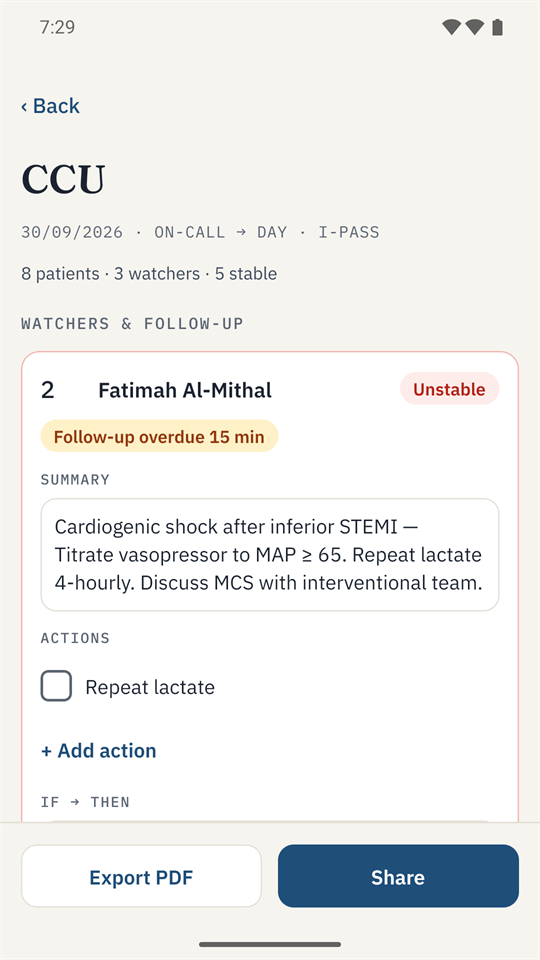
Handover and Present mode
I-PASS handover per area as text or PDF, and one patient per screen in large type for the consultant round.
Phone and computer
Android, Windows and Mac today, iPhone soon. Move your list between devices with encrypted backup files.
Your patients never leave your device
RoundXer has no server to send anything to. There is nothing to sign up for and nothing to trust but your own device.
- No account, no server, no tracking. No analytics, no ads, no crash reporting. The developer never receives any data.
- Encrypted on your device. An SQLCipher (AES-256) database, with its key in the device's own secure storage.
- Offline, enforced. The phone app never uses the internet — the Android app does not even have the Internet permission.
- Updates only when you ask. The computer app goes online only when you press Check for updates, and installs only signed updates.
- Backups you control. Encrypted files that only your passphrase or recovery key can open. App files stay out of cloud backups.
- App lock. Fingerprint, face or PIN, and automatic lock when you leave the app.
For your hospital's IT
Data leaves the device only when the doctor exports it. There is no vendor access: the developer cannot see or recover anyone's data. Encryption, keys, recovery, app lock and limitations are described in plain language for data-protection reviewers.
Free on your phone and computer
Install over an older version to update — your patients, settings and PIN stay. On a computer, Settings → About → Check for updates does it for you.
Android
Android 7 or later. Google Play coming soon; until then, install the app file and allow "Install unknown apps" once.
Download for AndroidiPhone
Coming soon through Apple's TestFlight, then the App Store.
Coming soonWindows
Windows 10 or 11. If Windows says "protected your PC", choose More info → Run anyway.
Download for WindowsAll versions, release notes and checksums: RoundXer releases.
Frequently asked
Is RoundXer free?
Yes. There is no account, no subscription and no advertising.
Where is my data stored?
Only on your own device, in an encrypted database. There is no RoundXer server, so nobody else — including the developer — can see it.
What if I lose my phone or get a new one?
The data on a lost phone stays encrypted. Back up regularly: a backup is an encrypted file you keep on your computer or another device, and you import it on the new phone with your passphrase or recovery key.
Can I use it with real patient information?
RoundXer is built for it, but the rules are your hospital's: follow its policy on patient information on personal devices. Many hospitals ask their IT or data-protection team to approve apps like this — the security summary is written for them.
Does it work without internet?
Completely. The phone app never goes online. The computer app goes online only when you press Check for updates.
Is RoundXer a medical device?
No. It is a note-taking and organisation tool for healthcare professionals. It gives no medical advice, makes no diagnoses and suggests no treatment.